Short answer: Yes, you can receive an incoming fax on your iPhone — but not with a send-only app. To receive faxes you need a fax number assigned to you, supplied by an online fax service. Once you have one, anyone can dial it from a fax machine, and the page arrives in the app (and usually as a PDF in your email) without any hardware on your end.
This trips people up because sending and receiving work differently. Sending a fax from a phone only needs a destination number — you type theirs and the app dials out through a gateway. Receiving is the reverse: someone has to be able to dial you, which means you must own a number first. There is no way around that part. A fax is addressed to a phone number, full stop, and a number has to be provisioned and pointed at your account before the first page can land.
The inbound flow: where an incoming fax actually goes
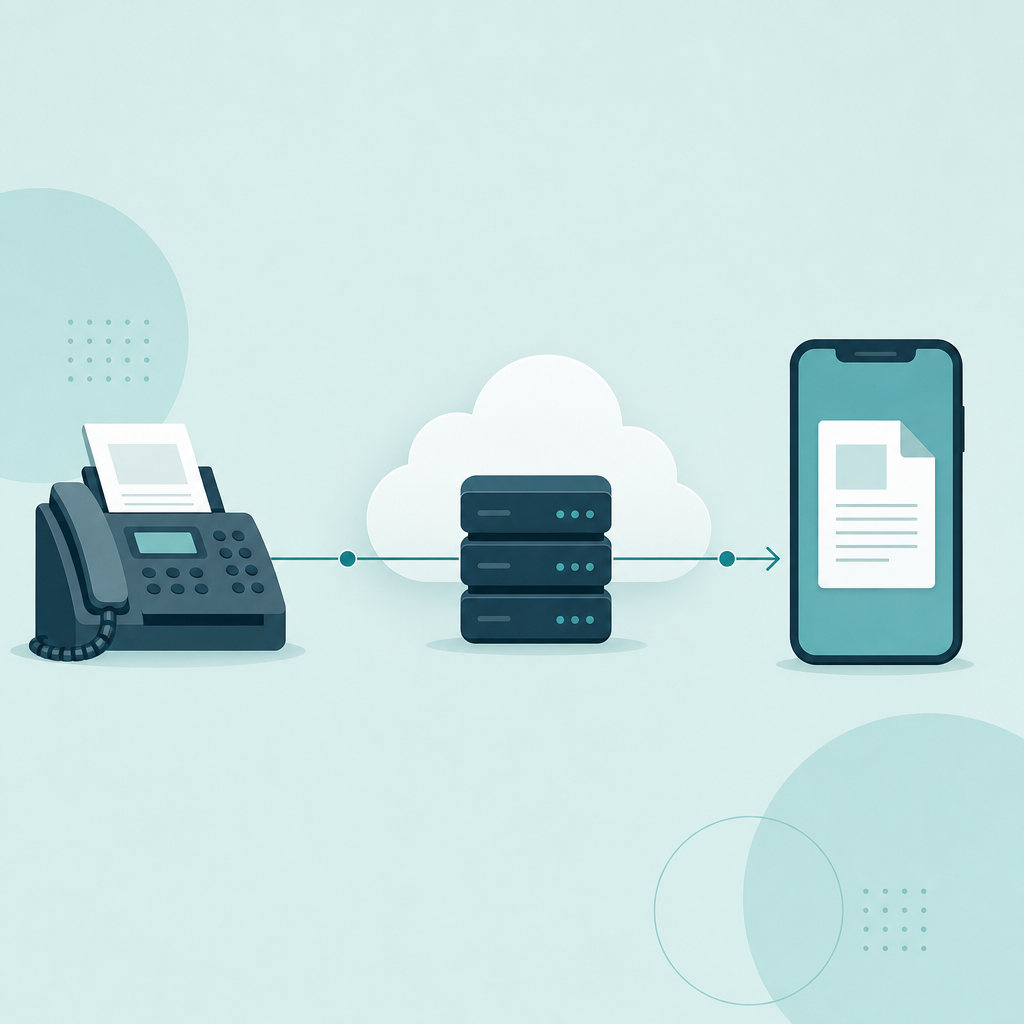
Here is the path a received fax takes, sender to inbox. None of it depends on your phone being awake.
- The sender dials your fax number from a real fax machine or another online service.
- Your provider's fax server answers the call and runs the ITU-T T.30 handshake — the same negotiation any two fax machines perform. When the call rides over the internet, the carrier side uses T.38 to keep the timing intact.
- The server receives the page as a 1-bit image, the black-and-white raster that fax has always used, and renders it to a file.
- That file is delivered to you — pushed into the app's inbox, and on most services, emailed to you as a PDF or TIFF attachment.
- You open it on your iPhone in the app or straight from Mail. iOS handles PDF preview, sharing, and saving to the Files app natively, so a faxed PDF behaves like any other document on the phone (per Apple's Files and Mail handling).
Notice what is missing from that list: you. The reception happens on the provider's server, not on your device. That single fact answers most of the questions below.
Do you need a dedicated number, or can you share one?
This is the real decision, and it is worth slowing down for. Some services hand you a private number tied to your account; others let you receive on a shared or temporary number. The tradeoffs are not subtle.
| Option | How it works | Good for | The catch |
|---|---|---|---|
| Dedicated fax number | A number reserved for you, on a paid plan; you can give it out and receive anytime | Anyone who receives faxes regularly — a clinic, a landlord, ongoing paperwork | It is a recurring cost, and you lose the number if the plan lapses |
| Shared / temporary number | A pooled or short-lived number you use for one-off receiving | A single expected fax you can catch in a known window | Hard to give out as "your" number; a fax sent later may go nowhere or to someone else |
If you only need to catch one incoming fax that you know is coming, a shared number can be enough. If people will fax you again — or you are putting the number on a form — get a dedicated one. The rule of thumb: a number you publish needs to outlive a single afternoon.
Myth-busting: the questions people actually ask
Most confusion about receiving faxes comes from imagining the iPhone is the fax machine. It is not. Once you accept that the provider's server answers the call, the rest gets simple.
Do I have to keep the app open to receive a fax?
No. The provider's server answers the incoming call whether your phone is on, off, or in your bag. The app and the email are just delivery — the reception already happened on the server. This is the single biggest myth, and letting go of it makes everything else click.
What happens to a fax sent while my number is inactive?
It depends on the number's state. If your number is live but you simply have not opened the app, the fax is received and waiting for you. If the number has been released — say a temporary number expired or a plan lapsed — the sender's machine gets a failed or no-answer signal and the page does not reach you. There is no universal "held in limbo" mailbox; a fax that can't be delivered to a working number is a fax that didn't arrive. This is exactly why a published number should be a dedicated one.
Is a received fax legally the same as a paper one?
Generally a faxed document carries the same weight as the paper version of that document — fax has persisted in law, healthcare, and finance for precisely this reason. But the legal status comes from the document and signature, not the transmission method, and rules vary by jurisdiction and document type. For protected health information specifically, U.S. HHS HIPAA guidance treats fax as an acceptable channel while still expecting reasonable safeguards on both ends. Treat this as general information, not legal advice; if you handle regulated documents, check your own jurisdiction and organization's policy.
Where do I even get an iPhone fax number?
From an online fax service — the same kind that powers send-and-receive apps. Numbers are provisioned by the provider, which assigns you one (often with a choice of area code) when you start a receiving plan. U.S. FCC guidance describes these virtual or online fax numbers as standard telephone numbers routed to internet-based fax services rather than to a physical line, which is why no landline or machine is involved on your side.
Receiving vs. just scanning — be honest about the ask
Before you pay for an inbound number, check what the other side actually wants. "Send it to me" and "fax it to me" are different requests, and people mix them up constantly. If someone just needs a clean copy of a document from you, you don't need to receive anything — you need to scan and send, and a free send path or a plain scan-to-PDF tool covers it. You only need a receiving number when documents are coming to you by fax and there is no email or upload option on the table.
So the order of questions is: Am I sending or receiving? If receiving, will it happen more than once? If yes, get a dedicated number. If it is a single inbound page and they could email it instead, ask whether they can — that is the cheapest fix of all.
A quick checklist before you give out your fax number
- Confirm it is dedicated if you will publish it on a form or hand it to a clinic or office.
- Note the area code you were assigned — some recipients expect a local one.
- Check the delivery format (PDF to email is the most portable; TIFF is older but valid).
- Test it once by having a known sender fax a single page, so you see the full path before it matters.
- Know what happens if the plan lapses — assume the number, and any fax sent to it afterward, is gone.
FAQ
Can I receive a fax on my iPhone for free?
Receiving almost always requires a number assigned to you, and a dedicated number is part of a paid plan rather than the free send path. Some services offer a temporary or shared receiving number at no cost for a single inbound fax, but you can't reliably publish that as your own. If faxes will come to you more than once, expect a recurring number plan.
Will the fax come as a PDF I can open in Mail?
On most online fax services, yes — the received page is delivered to your inbox as a PDF or TIFF attachment, and iOS opens both natively in Mail and the Files app. You can then save, share, or sign it like any document. Check your provider's settings to confirm PDF is the chosen delivery format.
Does my iPhone need to be on when the fax arrives?
No. The provider's fax server answers the incoming call and stores the page; your phone only retrieves it afterward. That is why you can receive a fax while your device is off, asleep, or out of signal — the reception is server-side, and the app or email simply hands you the result later.
Why does receiving a long fax take longer than I expect?
Because the inbound call still follows the ITU-T T.30 protocol on the carrier side: the two machines handshake, then transmit each page as image data at a fixed rate. That pacing sets the clock, not your phone — so a multi-page document takes proportionally longer to come through, even though the file lands in your inbox the instant it finishes.
What I'd do
If you need to receive faxes on a regular basis, get a dedicated number on a receiving plan, point it at your iPhone, and test it once with a page you control so you trust the path. If it is genuinely a one-time inbound page, ask the sender whether they can email or upload it instead — most can, and that beats provisioning a number you'll never use again. And stop picturing the phone as the fax machine: the call is answered on a server, your phone just opens the PDF. Fax Scan is built by CodeBaker, which makes a small family of phone-first utilities for exactly these "I need this handled now, on my phone" moments.